
04 - Change one thing
Change tension, bridge position, or how you strike an object, then compare the sound.

Step by step
- Step 1 of 4
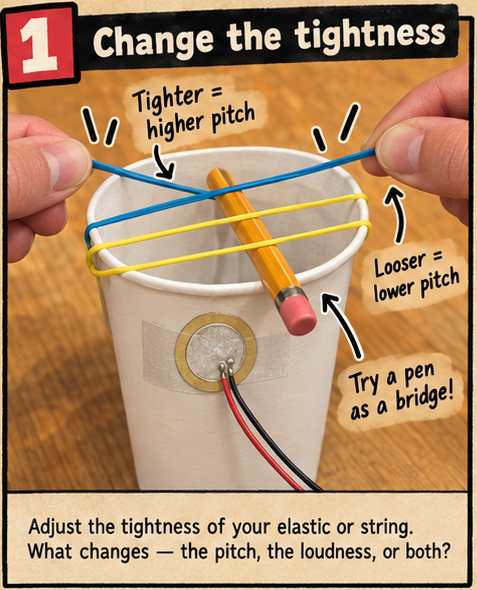
Change the tightness
Tighten or loosen an elastic band or string while keeping the object, sensor position, and plucking motion the same. Does the pitch, loudness, or both change?
- Step 2 of 4
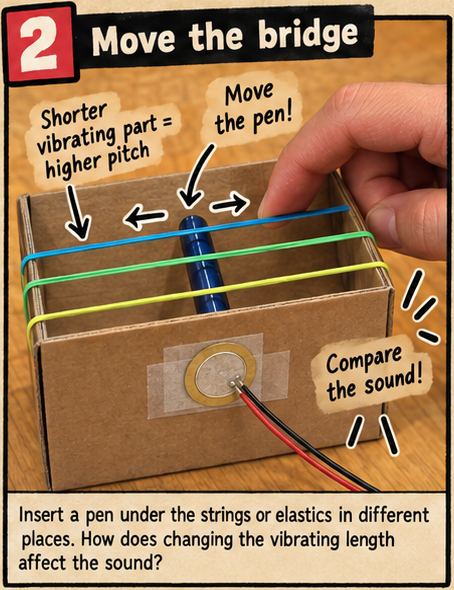
Move the bridge
Slide a pen or pencil under the strings or elastic bands to make a bridge. Move it to change the vibrating length, then pluck again. How does a shorter or longer vibrating section affect the pitch?
- Step 3 of 4
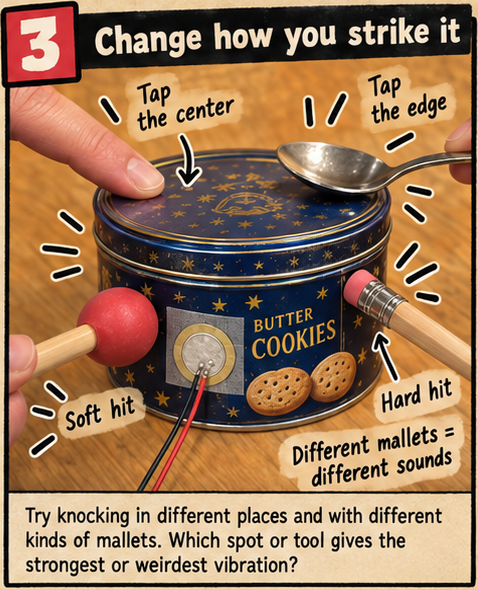
Change how you strike it
Keep the piezo on the same object. Compare tapping the center with tapping the edge, then compare gentle taps made with different tools. Change just one thing per comparison and listen for differences in loudness and tone.
- Step 4 of 4
Listen and compare in Junk Amp
Keep the listening volume low. Press Start Audio, allow microphone access, and select your piezo’s audio input. Play the object or instrument from this project and compare the sound and waveform. Change one thing at a time so you can hear what each change does.
/apps/audio/junk-amp/index.html